Architecture
How AnchorPT works.
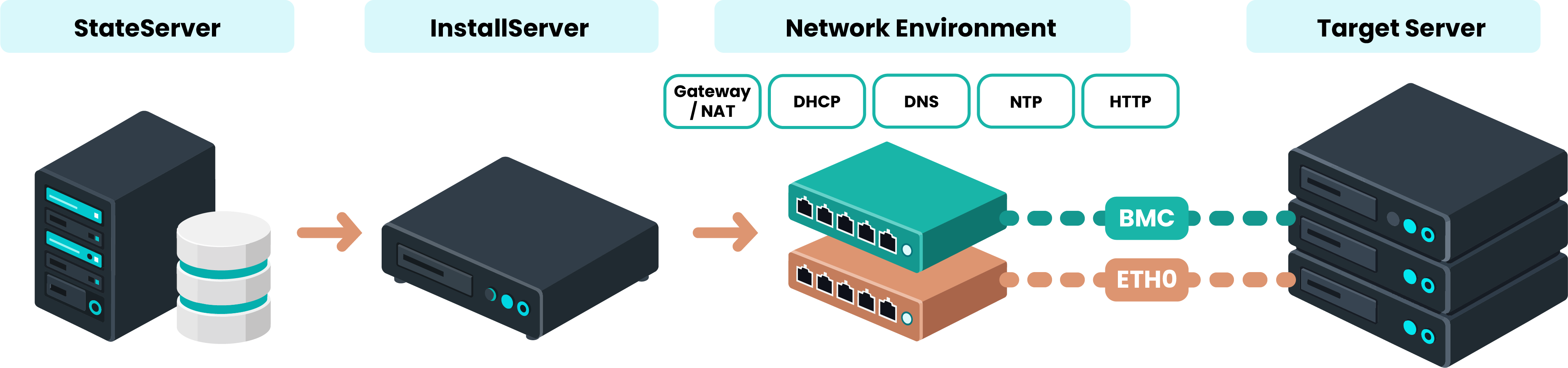
AnchorPT uses a centralized StateServer to manage provisioning, while InstallServers perform installation anywhere the installation target systems are connected.
Centralized management.
StateServer
The StateServer is the centralized management server for AnchorPT. It stores OS and firmware images and provides access through the Web UI, CLI, and REST API. It can run on physical or virtual infrastructure and can be co-located with an InstallServer in smaller environments.
Where the installation targets are connected.
InstallServer
The InstallServer creates simulated Network Environments and performs installation jobs. It communicates with the StateServer and provides the network connections required for BMC and OS installation. An InstallServer can handle multiple concurrent jobs.
Customized network environments for provisioning.
Network Environment
OS and BMC settings require a proper Network Environment with DHCP, DNS, NTP, and other services. AnchorPT stores these settings in an easily reusable form so jobs can rely on a consistent network.
From network setup to OS installation.
Provisioning
A provisioning job first configures the network environment, then configures the server's BMC through Redfish before installing the operating system. OS installation can be performed through network installation or virtual media. Jobs can also be copied for multi-system installations.
Provisioning Flow
Configure Network
Configure BMC
Install OS